marți, 28 august 2012

founders of #makr #startup make today from #diaspora #socialmedia tool next #facebook a community project #edtech20 #pln


 Diaspora the newest social media startup open source social network attempts to combine all of our social networking information into one powerful, secure and private (public only if you want) application. If you like diaspora you must read in my previous post here   http://bitly.com/collaborationincop2smile about my favorite top 10 curation tools to build a PLN . Last year I was verry upset when Diaspora Co-Founder Ilya Zhitomirskiy Dies at 22 and in this way one of the Diaspora Brains died , but other founders of this startup continue the adventure .
Features :
Choice
Diaspora lets you sort your connections into groups called aspects. Unique to Diaspora, aspects ensure that your photos, stories and jokes are shared only with the people you intend.
Ownership
You own your pictures, and you shouldn’t have to give that up just to share them. You maintain ownership of everything you share on Diaspora, giving you full control over how it's distributed.
Simplicity
Diaspora makes sharing clean and easy – and this goes for privacy too. Inherently private, Diaspora doesn’t make you wade through pages of settings and options just to keep your profile secure.
 Now I invite all of you to read last news about Diaspora received today on my email from founder Daniel Grippi :
,, Today, we are giving control of Diaspora to the community.As a Free Software social project, we have an obligation to take this project further, for the good of the community that revolves around it. Putting the decisions for the project’s future in the hands of the community is one of the highest benefits of any FOSS project, and we’d like to bring this benefit to our users and developers. We still will remain as an important part this community as the founders, but we want to make sure we are including all of the people who care about Diaspora and want to see it succeed well into the future.
If you look around, you’ll see that we’ve made an effort to open up to the community more to help better serve it. We’ve opened up our Pivotal Tracker for community developers help join in (You can sign up here), we’ve launched a tool that deploys one-click installations to the Heroku app hosting service, and we’ve updated joindiaspora.com to be more community-centric, showcasing other pods a user can join.
This will not be an immediate shift over. Many details still need to be stepped through. It is going to be a gradual process to open up more and more to community governance over time. The goal is to make this an entirely community-driven and community-run project. Sean Tilley, our Open Source Community Manager will spearhead community efforts to see that this happens. Stay tuned to our blog for a message from Sean concerning next steps, as well as ways to get involved in helping with the transition process.
This is a new opportunity for Diaspora to grow further than ever before. We can’t wait to see what we can do together.
Daniel and Maxwell



Makr is the place for simple, creative collaboration and give you the tools to easily pull content from anywhere on the web, add or change photos and text to remix it, and share it with the world. Makr encourage building on existing ideas to generate creative conversations. To get started, sign up now.
Makr Mission
The word “meme” doesn’t mean what it used to, but it’s really nothing more than an idea that spreads—no “Advice Dog,” “College Freshman,” or “Condescending Wonka” in that definition.
Makr want to give memes back to the Internet community—they are a way to communicate, to express ideas. Anyone should be able to make anything into a meme, without ugly meme generators or predetermined characters. Makr.io makes it easy to be a part of creating something on the web, and most importantly, Makr.io makes it easy to laugh and make others laugh. If there’s something better than laughing with your friends (or by yourself), we haven’t found it.
What can you do on Makr?
On Makr, you can “meme-ify” anything—add to the growing web of Internet culture, laugh, and share with friends. You can collaborate and share ideas with other Makrs in topics that you are interested in, and share your creations anywhere on the web. Explore posts, people, and topics to find the conversations and communities that fit you!
How do you Remix?
A remix on Makr.io is simply a riff on someone else’s post. You can remix any post on the site—just hover over a post and click the remix icon. You can change the post’s image, text or both. You can also remix from anywhere on the web—just install the Remix button to your bookmarks bar.
What is a Topic on Makr?
Topics are spaces where you can collaborate with people who share the same interests as you. You can start a topic thread yourself, or you can explore and join an existing one created by someone in the Makr community. You can be a contributor to a topic by sharing your own post or remixing another post in that topic.
How do you create a Topic?
You can create a topic by making a new post and adding a tag about the topic you want to create. From there, you can keep adding more posts to that topic.
Do you think these recent graduates have a chance competing with some of the biggest social networking platforms such as Facebook or Google Plus ? Please let me know what you think and add  comments  below about Diaspora and Makr.io .

duminică, 22 iulie 2012

Proud to be leader in Smile EUN Project COP2 and to present my top 10 #curation tools to build #edtech20 #PLN 4 #leadershipday12


Dear friends last year I had the pleasure to participate in Leadership  Day 2011 and today August 15 Dr. Scott McLeod launch a Calling to all Bloggers here for #leadershipday12  . Click here add your post and complete online submision form . Everyone then will be able to see your post in the complete list of submissions.

Like I mention in my previous post here http://bit.ly/prgessentials about my reflections after Intel Teach Training from Pargue, Ollie Bray, our brilliant trainer invite the participants to join also Social Media in Learning and Education Project managed by EUN . Janice Richardson, manager of the project said ,,   SMILE aims to investigate these issues and, through, an online learning course and mentoring techniques, not only encourage the take-up of social media in schools but also to map best practice in order to foster the exchange of ideas and experience” 
Facebook Awards Digital Citizenship Research Grant to European Schoolnet to implement SMILE :) Project and you can read more here  .  This project has 3 parts :
1. An online learning laboratory for 100 teachers from the 30 member states of EUN partnership to investigate and embrace the educational opportunities social media offers;
2.Research with the 100 learning laboratory participants to highlight trends and best practices for how social media is being used and can be used in classrooms;
3.Broad dissemination of results of the research through EUN’s interactive portals for teachers as well as through European and international meetings and conferences.


Still the begining I must told you that I  like verry much this project and for this reason  I was involved  in the discussions in 1st part of the project on the Elearning Platform managed by EUN http://leedu.eun.org/web/smile/home and for my research http://xeeme.com/LucianeCurator I was accepted to be COP2 leader .
            In XXI Century Education, the use of new online technologies ( social media and web 2.0 startup tools and apps ) aren't regarded like a avantgarde movement, but unfortunatelly although we have many free edtools most of the teachers still don't know or don't want to know how to integrate new online technologies into the classroom although in all the schools we have now computers connected to Internet . For this reason I want to implement Curation Restart Education project http://bit.ly/credproject also for romanian teachers and in the same time I am proud to be leader in COP2 organized in Smile Project and we discuss in our Community of Practices about : ,, Using Social Media in schools, whole-school approach " . First we must chose the tools for easy collaboration and sharing ( I chose scoop.it and Pinterest ) and now I will describe the features of 10 of my favorites ( 5 tools described here are startup tools many in beta ) and we must chose what to use in our Community of Practices and for this reason please add comments and proposes . We must also chose the platform who is suitable for us to collaborate 3 mounths and Smile:) I propose mightybell :) , but you can propose other .

I propose also for a good collaboration to use this blog http://smileprojectcop2socialmediainschools.blogspot.com/

where everyone can describe his / her favorite tool related to a subject . Now I will try to add a  short description of the tools and  some features for every tool or app .

I want to begin collaboration in our COP2 with the best 3 startup curation tools  to build and collaborate with  PLN  and for this reason I propose you dear members of my team to use next mounths still now in Smile Project : mightybell, scoop.it and pinterest

1. Mightybell is now my favorite Curation tool to collaborate eSafety with PLN and for this reason I want to use this tool / curation platform to collaborate in Smile Project . This is about infusing passion and color into everyday life. Too often, we spend time on what we have to do, not what we want to do. We’ve lost the ability to follow what makes us curious, in favor of choosing what makes us more efficient.With Mightybell, you can step into a world of curiosity and serendipity. By making space for ideas, interests and adventures with friends, you’re embracing the opportunity to create a more colorful life. Each Mightybell space has a story, one you can share with as many likeminded people as you want. You can share : a question, an article, a link, a video or a photo about something that interests you is all you need to start a Mightybell space. After all, you never know when you’ll discover your next passion.


2. Scoopit is my favorite and the best social media curation tool for easily publish gorgeous magazines. Leverage Curation to increase your visibility. Give persistence to your social media presence. I must told you that you can tag and describe every post on scoop.it .

For our Community of Practices 2  I made a community http://www.scoop.it/t/smileprojectcop2/ where everyoane can suggest a tool or a post, after follow our community .


3. Pinterest is now the tool on the wave hwo bring more trafic than twitter and facebook . For this reason I made a board here http://pinterest.com/lucianecurator/cop2insmileproject/ . Follow Me on Pinterest
Source: scoop.it via Lucian on Pinterest


Pinterest lets you organize and share all the beautiful things you find on the web. Teachers use pinboards to manage their projects and also People use pinboards plan their weddings, decorate their homes, and organize their favorite recipes. Best of all, you can browse pinboards created by other people. Browsing pinboards is a fun way to discover new things and get inspiration from people who share your interests. To get started, request an invite or leave a comment after you read my post with your email and I will send you a invitation to try this curation tool . Also don't forget that you must pin a immage to bookmark on pinterest .    


4. Pearltrees it is also a awesome social media curation tool , and I must told you that I was verry excited when I begin to use it and this is 1st Curation tool . Pearltrees is the best way to organize, discover and share the stuff you like on the web. How does it work? Pearl the stuff you like on the Web and collaborate with friends .
Features :
You can keep at hand the web pages you like and enrich your account with Pearltrees from other members of the community.
Who is Pearltrees made for ?

Anybody who has ever wanted to keep a webpage (about a favorite project, for researching travel, for conducting research or just because there are things you've found that you don't want to lose...) to retrieve it one day or to share it with someone. This means a lot of people!

What makes Pearltrees so special ?

It's probably different for each user but Pearltrees lets people:

have everything they like on the web organized in one place.

access their web items from anywhere using a PC, a Mac or an iPad to enjoy a unique visual interface to keep everything they like at hand, play with pearls, they're made to be manipulated.

discover the pearltrees from other members of the community, everything is public!
  #edtech20 and curation / #edtools / #elearning in Lucian Duma bit.ly/Lucian20 (web20education) 
5. Springpad Smart Notebooks to save, share and act on what's important to you and to your friends .Springpad now makes it easy to invite your friends so you can make awesome notebooks together. Springpad is great for just about anything and it's even better when you invite your friends.Springing just got easier .Now you can just type in the information you want to save and let Springpad do the rest. Try typing in a task you want to remember, an event you want to save, a movie you want to see, or a product you want to buy. It's that easy!
Share and explore
Have you curated the perfect summer reading list?  The best places to visit in your neighborhood? Now, you can share your knowledge and passions with the world by making any notebook public.
Or, if you see someone else's notebook that you find interesting, you can follow it to see future updates.
The privacy of your contents is now controlled at the notebook level. Make a notebook public or private, and all of its contents and attachments will have the same setting. 


6.Learnist is the latest social media curation tool for education , still in beta launch by Grockit team . Learnist super easy to share what you know by pointing to existing web resources. You can use videos, blogs, books, documents, images, anything to explain how to learn something.
Features
Use Learnist to share what you know and learn new things. Create Learn Boards on topics you understand and add learnings by pointing to videos, blogs, images and documents on the web. Board creation permissions are granted on rolling basis.


6.Chime.in is a social network based on interests, where people share, connect with others, and build communities around their favorite topics . Chime.in is designed so that people can share their thoughts, photos, videos, and links. It could also turn into a marketing channel for entertainment brands 
Features :
Broadcast your Interests
Chime.in is designed for sharing your opinions, questions, and all the amazing media you come across each day.
Combine text, photos, videos, links, or polls in a Chime
Find new audiences for your content by tagging your Chimes with relevant Interests
Make new friends
Chime.in makes it really easy to connect with people who like the same things as you do.
Join the conversation by liking, sharing, or commenting on Chimes
Build deeper relationships by joining Communities about your Interests
Discover more about your Interests
Chime.in helps you find the best content about your favorite things.
Subscribe to an Interest to see all Chimes tagged with that topic
Sort your Chimelines by likes, shares, or comments to find the most talked about Chimes
Re-Engage With A Click
Send quick follow up messages, meeting invites, birthday cards and more with just a single button click


7. Zoku is the easiest way to strenghten your business relationships .
Track Important Relationships
Organize information and communications with your customers, investors, recruits, and other important business contacts.
Stay Up-To-Date On Key News
Get alerts for key personal and professional news such as promotions, press mentions, family events, travel plans, and much more.
Re-Engage With A Click
Send quick followup messages, meeting invites, birthday cards and more with just a single button click.
After I describe this startup curation tools to build a PLN I also suggest you to use old groups for collaboration on facebook, google plus and diigo .


8. Facebook is a social utility social media tool that connects people worldwide with friends and others who work, study and live around them. I must told you this is a tool I use daily to keep in touch with friends and I am member in more than 30 groups,I made a group https://www.facebook.com/groups/TIS4ETWINNERS/ and a facebook page for Curation Restart Education Project . If I don't find Mightybell groups I suggest COP2 to use facebook groups .


9. Diigo is a powerful research tool and a knowledge-sharing community . Diigo Groups provides a ground-breaking collaborative research and learning tool that allows any group of people to pool their findings through group bookmarks .


10.. Google Plus is also a new tool to build a #PLN .

Google+: real life sharing, rethought for the web.


Google+ aims to make sharing on the web more like sharing in real life. Check out Circles, Messenger and Hangouts, just a few of the things we've been working on.

I made a page for #edtech20 #socialmedia #curation project to keep in touch with PLN http://goo.gl/wyidi


I am happy to be also Glogster Edu Ambassador and I suggest all of you to use with students the best edtool GlogsterEdu - Poster yourself - Make your interactive poster easily and share it with friends. Mix Images, Text, Music and Video. It is fantastic!


WBG Sensible SocialMediaChecklist v2.0 Sensible Social Media Checklist for Business v.2.0 [INFOGRAPHIC]


Courtesy of: The Whole Brain Group

marți, 19 iunie 2012

My Top 10 exciting new #startup at #leweb12 Competition #edtech20 #iste12


Like I write before when I describe ,, Curation Restart Education Project " and  top 10 curation startup tools who will change research  http://bit.ly/credproject every day appear new startup tools who open gateway through knowledge for everyoane . 

For this reason my next post will be ,, Top 10 tools to brand your name " . If you like what you read leave your comments , share and leave your feed-back .Today and tomorrow is organized Leweb London 2012 #leweb http://london.leweb.co/ . You can follow live  in youtube this event

a


You can follow also this event on twitter #leweb #leweb12 .

 I also describe in curation blog some curation startup from this top 10 tools. Next 3 apps are browser apps
               
1.  Hojoki is a curation tool who make all your apps to work as one .
Features :
-One newsfeed for all your productivity apps.
-See what's happening and react instantly.
-Discuss your work in private workspaces.
-Apps for web, iPhone/iPad and Android.

                BusyFlow


2.BusyFlow 
BusyFlow is a workspace where you can interact with all your web-based apps (such as Dropbox, Google Docs, Pivotal Tracker etc.) in one place. Watch the screencast to see how it works and add a comment if you like .
Features : Collaborate Effectively using Cloud Apps


See an Overview of All Your Apps
Within the news feed, you can track all changes on all of your apps and projects. You can react to these changes from BusyFlow interface (e.g. discuss a GitHub commit, or accept a finished Pivotal Tracker task).
Work Together on a Private Project's Wall
Each workspace, called a hive, has its own discussion wall where you can post your thoughts or just share a link. From the wall you can also post items directly to other apps. For example, create a Google Calendar event in just one line.
Removing Boundaries Between Cloud Apps


3. Smarchive Get rid of the paper chaos! With smarchive you can keep track of all your contracts, bills and other bothersome paperwork.Smarchive is the “smart archive“, the first web-based document management system
for individuals. No matter whether correspondence or e-mail attachment: just scan it, transmit it or photograph it with your smart phone, and all your documents are directly uploaded into your archive.
Your cell phone contract, your electricity bill or a digital backup copy of your ID: at last you simply have everything stored in one central place and always know where to look for it.

Now I describe here some mLearning startup apps


4 . Vimention
create the next geosocial platform. At this early stage you can have much impact on the direction we are developing Vimention.
Features
Easy to get in.
Use your existing Facebook or Twitter account to join Vimention.
It's that easy.
Keep up with your friends.
Invite your friends to use Vimention as well. You will have much more fun sharing together.
Mashup.
See posts and media from other social networking sites that you have connected to your account.


5. Voxer Turn your phone into a Walkie Talkie.
Don't waste time on phone calls and voicemails.
Voxer is a Walkie Talkie app for smartphones. Send instant Audio, Text, Photo and Location messages to one friend or a group of your friends. Your friends can listen to your message while you talk or check it out later.
Features
LIVE WALKIE TALKIE
Cross Platform Messenger
VOICE, TEXT, PHOTOS and LOCATION
GROUP CHATS
EVERYTHING is FREE
No annoying advertisements
Works over WiFi, 3G and any other data network
Get notifications for new messages
Create messages even offline
Play voice messages faster
Connect with Facebook friends on Voxer
Voxer turns your iPhone/iPad/iPod touch device into the ultimate Push To Talk (PTT) real-time Walkie Talk

6. Blippar is  a augmented reality app magical new way for your favourite brands, retailers and publishers to get exciting new messages, offers, experiences and helpful real-time information to you. Blipp to explore, experience and engage. Features :
•Browse the in-app catalogue or look for a blippar ‘b’ in the real world
•Hold you phone up in blippar camera mode to the image or object
•Blipp (no scanning or photo-taking required!)
•You won’t know what the blipp is until you try it....
•Just hold, wait, enjoy and share...

7. Teleportd Find and use in real-time relevant crowd-sourced photos from the smartphone generation 

Search

in real-time through the latest photos from the smartphone generation by location, key words and time period.

Select

the most powerful images in an instant and subscribe to feeds of photos based on search queries relevant to your needs.

Display

crowd-sourced photos relevant to you in a few clicks via our plugins or through a set of powerful APIs.

8. Appafone
Reduce information overload with a new ambient app you don't even have to remember to open.
Subscribe to categories with a tab and get updates about them when you're out in the real world as you walk by.
Searching for nearby shops, places people and things on your phone can be time wasting and frustrating, we filter the most relevant information so you get the right information at the right time.
Easily deactivate notifications for any topics with just one tap.
No need to sign up, stay anonymous.


9.  NearNote = Information + Context.
We use a platform for dynamically localising information by geographical location, through a process called geofencing.
So what does this mean to you? Download the app, sign up with your social accounts, help us define your interests, and we’ll connect you with all the interesting stuff that’s happening in your vicinity, whether that’s traffic, local events, social news, hyper-local weather or something else.
The possibilities are endless. Why not be one of the first to try it out?
                             

10 .millenoki's solutions (“datasquasher”; “mailsuite”; and “clearmymail”) allows users and enterprises to take control of their messaging and mobile data services, reducing mobile data costs by up to 98%. Offering complete independence of form factor (phone, tablet or laptop), handset type and operating system, millenoki’s products will work right now with your current device.

Welcome in the New Tech Age because Curation Restart Education in our Project http://bit.ly/credproject ; Follow http://twitter.com/web20education http://xeeme.com/LucianeCurator ; like http://web20education.bo.lt/credprojectfacebookpage . and get free our mLearning app http://web20education.bo.lt/credapp . Subscribe to My blogs http://bitly.com/feededtech20blogs ; http://bitly.com/egr8blog : related to new web 2.0, social media startups http://bitly.com/web20eblog , curation http://bitly.com/curationblog ; mLearning apps http://bitly.com/mLearningblog , google plus http://bitly.com/googleplusblog , and my romanian blog http://bitly.com/eblogulmeu .

joi, 17 mai 2012

My reflections after #prgessentials organized by #Intel & #GlogsterEdu

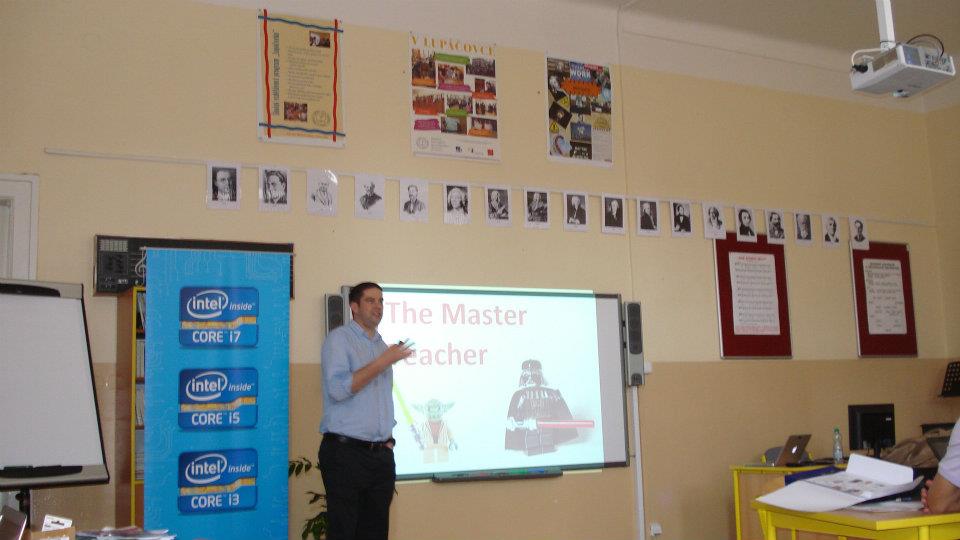
Still the begining I want to tell you that I have the pleasure to be invited by Deena Kelly, GlogsterEDU director, and I received a phone from Justin Landis to take part like a GlogsterEDU Ambassador http://dumacornellucian.edu.glogster.com/ to Intel Teach Essentials organized in Prague between 22 - 25 may 2012 .   I must told you that I tried in last 3 years many times to make a Intel Teach Course here in Romania , but I find only online on   http://iteach.ro/  . I have the surprise to find that our trainer is Ollie Bray, that I meet on the elearning platform of Smile Project managed by European Schoolnet who is National Adviser for Emerging Technologies in Learning at LTScotland .


 Also we have a brilliant Intel Education trainer from UK Ruth Merrett who was in our project team in the right ( Marta and Mihaela ) and help us in our unit project and I learn from her how to make a succesful project and a lot of things .

Ollie present us the Intel Teach Essentials in a marvelous mode on next 8 Modules :
- Module 1 - Teaching with projects 
- Module 2 - Planning your teaching Unit
- Module 3- Making Connections
- Module 4 - Creating Samples of Learning
- Module 5 - Assessing Student Projects 
- Module 6 - Planning for students succes
- Module 7 - Facilitating with Technology
- Module 8 - Showcasing Unit Portfolios

In the first day of the training I discover that all the  GlogsterEDU founders are from Czech Republic : Patrick Pepsi, Tomas Plojhar Roman Smola, Martin Santorcl  and Stanislav Sramek and they present us GlogsterEDU features coming next school year and also all were invited to propose new features for the best XXI Century Education tool . Some features are the next to have a good management from your public  dashboard .

I have also the pleasure to present my Curation Restart Education project http://credproject.visibli.com/share/SkZjmz in the day 2 when we speack about module 3 making connections and I present my curation GlogsterEDU http://dumacornellucian.edu.glogster.com/credproject/ 

Ok . I must told you that we have also a lot of fun because we discover some Prague pubs were all drink beer :) ,   Brilliant Krizikova Fontana and also we visit the center and many historic buildings . 


If you were in Prague what do you like more ? Leave a comment and feed- back here  


In XXI Century Education the use of new online technologies web 2.0 and social media aren't regarded like a avantgarde movement, but we must learn how to use them even more as every day appear new free html5 tools and apps who can open gateway through knowledge for teachers and also for students . GlogsterEDU, my favorite tool where I am proud to be the 1-st Romanian GlogsterEdu Ambassador made a team with Intel Education and they organize in partenership Intel Teach Essentials Course in Prague, Czech Republic . They invite Glogster Edu Ambassadors all over the Europe to take part at this exciting opportunity and fortunatelly I will be in Prague between 22 - 25 and will take part to this Intel training who will provide us with the skills to integrate technology into our existing curriculum with the ultimate goal of improving student learning . If you read this blog post and you will participate also leave feed-back and comment . 
GlogsterEDU, SymbalooEDU , Edublogs , Edutopia, Computer-Using Educators and VolunteerSpot will organize in 40 days http://isteparty2012.com/ to help teachers worldwide to meet and share knowledge .
 For this reason 3 years ago I begin to use social media  with students in free educational projects in the online world . This year and last year I was also not only participant, but also judge in ThinkQuest Projects . Now I am eTwinning mentor .Because my web 2.0 project was finalist in Elearning Awards 2010, I launch ,, CURATION RESTART EDUCATION " PROJECT http://credproject.visibli.com/share/SkZjmz , but I need help to make a platform / website for this project where teachers worldwide can collaborate and share knowledge like http://web20ineducation2010.ning.com/profiles/blogs/proiectul-cred-in-competitia-nationala-restart-in-educatie? . 
After I return home from Prague I will add a blog post here ,, Top 10 tools to brand your name " because I live acroos all networks 
http://xeeme.com/LucianeCurator  .


miercuri, 2 mai 2012

WOW #mit and #harvard launch now #curation and #elearning platform #edX


Last year I read many articles about many free Mit elearning courses, but today Harvard and Mit launched edX see here 

What you think about this initiative ? Leave a comment :)
An organization established by MIT and Harvard that will develop an open-source technology platform to deliver online courses. EdX will support Harvard and MIT faculty in conducting research on teaching and learning on campus through tools that enrich classroom and laboratory experiences. At the same time, edX also will reach learners around the world through online course materials. The edX website will begin by hosting MITx and Harvardx content, with the goal of adding content from other universities interested in joining the platform. edX will also support the Harvard and MIT faculty in conducting research on teaching and learning.

Who will lead edX?
EdX is a priority for the leadership of both Harvard and MIT, and it will be governed by a board made up of key leaders from both institutions, appointed by each university’s president. MIT Professor of Electrical Engineering and Computer Science Anant Agarwal will be the initial President of edX and will report to the board.

What technology will edX use?
An open-source online learning platform that will feature teaching designed specifically for the web. Features will include: self-paced learning, online discussion groups, wiki-based collaborative learning, assessment of learning as a student progresses through a course, and online laboratories. The platform will also serve as a laboratory from which data will be gathered to better understand how students learn. Because it is open source, the platform will be continuously improved here http://www.edxonline.org/index.html


CURATION RESTART EDUCATION PROJECT http://bit.ly/credproject . Welcome in the new Age of #Curation http://bit.ly/CurationKing & http://bit.ly/curationglog by @ https://twitter.com/#!/web20education - wish you all Lucian http://xeeme.com/ecurator/ . I invite to subscribe for NEW #edtech20 #socialmedia #Curation newsletter http://bitly.com/edtech20newsteller register to join free http://bitly.com/docedtech20 #edtech20 #socialmedia #curation project http://web20education.bo.lt/g6538 and Install free our #mlearning app http://bitly.com/edtech20mLearningapp .Like and collaborate on facebook http://on.fb.me/likeedtech20facebookpage and Circle on Google Plus http://bitly.com/circleedtech20googlepluspage and Subscribe free to gr8 #edtech20 blogs : top 10 blog http://bitly.com/egr8blog :http://bitly.com/feededtech20blogs related to new web 2.0, social media startups http://bitly.com/web20eblog , curation http://bitly.com/curationblog ; mLearning apps http://bitly.com/mLearningblog , google plus http://bitly.com/googleplusblog , and my romanian blog http://bitly.com/eblogulmeu . Like and collaborate on facebook http://on.fb.me/likeedtech20facebookpage , linkedin http://linkd.in/edtech20linkedin , diigo http://bitly.com/edtech20diigo

Featured Post

For #notatiste15 : Top 100 presentations #elearning #edtools and #ipad apps to emaze a global audience like #iste2015

Between 28 june and 1 july in PHILADELPHIA, USA  is organized ISTE’s Annual Conference and Exposition  https://www.isteconference.org/201...

Totalul afișărilor de pagină