
Dear friends I hope all of you had a Blessed Christmas and you like my social media curation Christmas Tree made for you . Now I want to wish you all Happy New Year 2013 with peace and happiness and I hope next year all your dreams come true and I invite you to drink with me a cup of champagne . I really want next year to find parteners who want to help me to launch a platform / website for Curation Restart Education Project https://twitter.com/web20education and teachers who want to collaborate with me in this global project . In the same time I will continue to describe weekly my top10 tools related to a topic here
My 2012 year in review - a curation story : http://checkthis.com/fvn
Now I will describe favorite social media curation apps for ipad . What app do you use / you like more and why ? Please leave a comment and feed-back .
I invite you all also to read next blog post : 2012 year in review with my top 10 articles this year .

Learnist is one of my favorite social media Curation startup tool for education and for this reason I integrateLearnist in my Curation Christmas Tree . Learnist makes sharing what you know and learning from others fast and easy by remixing anything on the web like videos, ebooks, maps, blogs, podcasts, surveys and more into a simple and elegant learning resource on any topic that you can share with anyone. Learnist is like a collaborative, multimedia and interactive ebook from the future.
Features :
Learnist iPad app lets you browse Learnboards with content curated from websites and blogs, YouTube, Vimeo, Wordpress, Wikipedia, UStream, Scribd, Soundcloud, Slideshare, Amazon, Google Docs, Spreadsheets, Forms, Slideshows, Google Maps and Books, and more.
Learnist’s iPhone App also lets you create Learnboards with uploaded photos on any subject imaginable - live events, recipes, how-to guides, and more.
Browse and Learn
- Browse Learnboards created by experts, teachers, professors, your friends and fellow learners covering thousands of topics in categories like Art & Design, Music, Sports, Education, Food & Drinks, Politics, Technology, Travel, Games, Health & Fitness, News, Entertainment, Crafts and more.
- Follow your favorite Learn Boards and people to get updated on their newest content.
- Collaborate and ask questions about anything in Learnist and help others on topics you know.
- Track your progress on Learnboards and see that progress on your profile page.
- Find information by quickly searching tags, titles and keywords.
Share Easily
- Curate learning resources you like and share them with your followers.
- With the iPhone app you can instantly upload content to Learnist from your iPhone camera or photo gallery.
- Share via email, SMS, Facebook, and Twitter
 Flipboard is a personal news magazine filled with everything being shared across the Web, from breaking news to stories on world events, sports, travel and more. Simply pick a few topics and your Flipboard is instantly populated with the news you care about. If you want more, use the search bar to find favorite sources or browse recommended reading from the staff at Flipboard. When you find a new source you love, just tap the “+” to add it to your Flipboard. And if you’re short on time, use the Cover Stories tile to see some of the most interesting stories from all of your sections on Flipboard.
But it’s not just about news. Use Flipboard to flip through social networks. Add Facebook, Twitter to browse articles and photos friends are sharing. Instagram and Flickr photos are beautiful to see in your personal magazine. Now the news your friends share is easy to flip through, with headlines and excerpts that give you an immediate glimpse into everything. It’s a fun way to catch up on all your social news.
Just tap a tile and start flipping through the pages of your magazine.

Escape with Trapit and hone in on only the subjects that matter to you. Keep up with the topics that don’t always make the headlines, or even the ones that do. Discover new bloggers, online magazines, newspaper features and more among Trapit’s over 100,000 hand-picked sources.. Use Trapit to explore and discover, because really, that’s what the Internet was made for.
Features:
- Trapit captures fresh content from across the entire Web.
- You define the subjects--use Trapit to explore new topics or long standing passions.
- Trapit learns from your feedback and improves its recommendations the more you use it.
- A world of discoveries at your fingertips--discover new blogs, magazines, and writers.
- Easy sharing to Twitter, Facebook, and email, and anywhere else you like. And now scheduled sharing via Buffer.
- Get real-time highlights from all your Traps in the New Discoveries feed.
- Save articles, recipes, tutorials, and blog posts to your Trapit Reading List, Evernote, Instapaper or Pocket with the “Read Later” button.
Experience the Internet on the iPad the way it was meant to be. Download Trapit today!

1 . Evernote turns the iPhone, iPod Touch and iPad into an extension of your brain, helping you remember anything and everything that happens in your life. From notes to ideas to snapshots to recordings, put it all into Evernote and watch as it instantly synchronizes from your iPhone to your Mac or Windows desktop. See why millions of people worldwide use Evernote:
Key features of Evernote:
Create text, photo and audio notes
Auto-synchronize your notes to your Mac, PC, and Web
Magically makes text within snapshots searchable
Mark notes as "Favorite" for quick access
All notes include geo-location information for mapping and search
✶ Premium Feature: File Synchronization - add, sync, access, and share files (PDF, Word, Excel, PPT, and more) among the different versions of Evernote you use
Here are some ways to use Evernote for your personal and professional life:
For research and class notes
To capture blog ideas and design inspiration
To stay in-sync with your desktop notes, web clips, and files
To snap photos of whiteboards and wine labels
As part of your GTD system to help you stay organized
To record voice memos

2 . Dropbox is a free service that lets you bring all your photos, docs, and videos anywhere. After you install Dropbox on your computer, any file you save to your Dropbox will automatically save to all your computers, your iPhone and iPad and even the Dropbox website! With the Dropbox app, you can take everything that matters to you on the go.
Read your docs or flip through your albums when you're out and about. Save photos or videos to your Dropbox and share them with friends in just a couple taps. Even if you accidentally leave your iPhone in a taxi, your stuff is always safe on Dropbox.
Features:
● Always have your stuff with you, no matter where you are.
● Add files to "Favorites" for fast, offline viewing.
● Easily save photos and videos to your Dropbox.
● Share your photos and docs with family and friends.
● Save email attachments straight to your Dropbox
Learnist iPad app lets you browse Learnboards with content curated from websites and blogs, YouTube, Vimeo, Wordpress, Wikipedia, UStream, Scribd, Soundcloud, Slideshare, Amazon, Google Docs, Spreadsheets, Forms, Slideshows, Google Maps and Books, and more.
Learnist’s iPhone App also lets you create Learnboards with uploaded photos on any subject imaginable - live events, recipes, how-to guides, and more.
Browse and Learn
- Browse Learnboards created by experts, teachers, professors, your friends and fellow learners covering thousands of topics in categories like Art & Design, Music, Sports, Education, Food & Drinks, Politics, Technology, Travel, Games, Health & Fitness, News, Entertainment, Crafts and more.
- Follow your favorite Learn Boards and people to get updated on their newest content.
- Collaborate and ask questions about anything in Learnist and help others on topics you know.
- Track your progress on Learnboards and see that progress on your profile page.
- Find information by quickly searching tags, titles and keywords.
Share Easily
- Curate learning resources you like and share them with your followers.
- With the iPhone app you can instantly upload content to Learnist from your iPhone camera or photo gallery.
- Share via email, SMS, Facebook, and Twitter
But it’s not just about news. Use Flipboard to flip through social networks. Add Facebook, Twitter to browse articles and photos friends are sharing. Instagram and Flickr photos are beautiful to see in your personal magazine. Now the news your friends share is easy to flip through, with headlines and excerpts that give you an immediate glimpse into everything. It’s a fun way to catch up on all your social news.
Just tap a tile and start flipping through the pages of your magazine.
Trapit is a startup app to rule the web using ipad .
Connect with long standing passions and explore new subjects, all delivered in a elegant experience meticulously designed just for the iPad. Built with powerful AI technology, Trapit delivers an on-going personalized selection of the newest articles, features, blogs and video on the topics you care about and learns as you use it.Escape with Trapit and hone in on only the subjects that matter to you. Keep up with the topics that don’t always make the headlines, or even the ones that do. Discover new bloggers, online magazines, newspaper features and more among Trapit’s over 100,000 hand-picked sources.. Use Trapit to explore and discover, because really, that’s what the Internet was made for.
Features:
- Trapit captures fresh content from across the entire Web.
- You define the subjects--use Trapit to explore new topics or long standing passions.
- Trapit learns from your feedback and improves its recommendations the more you use it.
- A world of discoveries at your fingertips--discover new blogs, magazines, and writers.
- Easy sharing to Twitter, Facebook, and email, and anywhere else you like. And now scheduled sharing via Buffer.
- Get real-time highlights from all your Traps in the New Discoveries feed.
- Save articles, recipes, tutorials, and blog posts to your Trapit Reading List, Evernote, Instapaper or Pocket with the “Read Later” button.
Experience the Internet on the iPad the way it was meant to be. Download Trapit today!
Do you like this app . Leave also a comment if you know other apps like this
This week I decide to describe on my blog many curation apps to mLearning .

Scoop.it lets you easily publish gorgeous online magazines by curating content on your favorite topic using your iphone . This tool is my favorite social media curation tool .
Curate on the go with the Scoop.it iPhone App:
- Select, edit and publish posts in the same engaging visual format as from the Web site
- Review your suggestion list
- Add posts from Safari mobile
- Share on all your connected Facebook, Twitter, Tumblr... accounts
You can downlod from app store for tree scoop.it .

Pinterest
Pinterest is a Virtual Pinboard and it is my favorite curation tool for my interests . It lets you organize and share all the beautiful things you find in your life. People use pinboards to plan their weddings, decorate their homes, and organize their favorite recipes.
Best of all, you can browse pinboards created by other people. Browsing pinboards is a fun way to discover new things and get inspiration from people who share your interests.
Features:
• Browse pins from people and pinboards you follow.
• Repin, like and comment on your favorite pins.
• Pin with your camera!
Happy pinning!

What makes Pearltrees unique?
have everything you like on the web organized in one place
play with pearls, they are made to be manipulated
share great content instantly, everything is public
join +250.000 other users who are sharing +10 million pearls access your account from PC, Mac and iPad
its free! (with no advertising)
How does it work?
create your account
install the pearler
collect web pages with the pearler
organize your pearls into pearltrees
explore what you’re interested in
enrich your account
share!

This week I decide to describe on my blog many curation apps to mLearning .
Scoop.it lets you easily publish gorgeous online magazines by curating content on your favorite topic using your iphone . This tool is my favorite social media curation tool .
Curate on the go with the Scoop.it iPhone App:
- Select, edit and publish posts in the same engaging visual format as from the Web site
- Review your suggestion list
- Add posts from Safari mobile
- Share on all your connected Facebook, Twitter, Tumblr... accounts
You can downlod from app store for tree scoop.it .

Pinterest is a Virtual Pinboard and it is my favorite curation tool for my interests . It lets you organize and share all the beautiful things you find in your life. People use pinboards to plan their weddings, decorate their homes, and organize their favorite recipes.
Best of all, you can browse pinboards created by other people. Browsing pinboards is a fun way to discover new things and get inspiration from people who share your interests.
Features:
• Browse pins from people and pinboards you follow.
• Repin, like and comment on your favorite pins.
• Pin with your camera!
Happy pinning!
have everything you like on the web organized in one place
play with pearls, they are made to be manipulated
share great content instantly, everything is public
join +250.000 other users who are sharing +10 million pearls access your account from PC, Mac and iPad
its free! (with no advertising)
How does it work?
create your account
install the pearler
collect web pages with the pearler
organize your pearls into pearltrees
explore what you’re interested in
enrich your account
share!

Flud - For the first time ever, the things you read about give you topical credibility among your friends and followers. Beautiful design, simple user interface, and integrated social settings make Flud the best place to read your news.
Customize Flud to your personal tastes. Follow all your favorite blogs and news sites, save stories to read when you have time or offline, Flud articles you love, connect with friends and other Fluders who share your interests. Your Flud profile allows you to discover your news personality and become a credible source of information.
Features
- Easily add, reorder, or remove feeds
- Connect to Tumblr, Google Reader, Twitter, Facebook, Read It Later, Instapaper and email
- Create a Reading List of headlines that look interesting to you
- Access your Reading List wherever you are, no Internet required
- Play video, view images, read stories
- Find Fluders who share your interests in news, blogs, and topics
- Flud articles you love and share them with your followers
- See what your followers are reading with the Activity Feed
Uses
- Build your brand by tweeting the latest industry news
- For bloggers, offer Flud to your readers as a way to experience your content on a mobile platform
- Discover new websites, writers, blogs, or topics you didn’t know you loved
- Browse niche blogs and major news brands, silly news and science journals, at the same time
- “It's easy and good looking.
 Livebinders allowss you to get the most from your iPad
LiveBinders app for iPad gives you quick access to all of the binders you've created and those you've collected on your custom shelves. This version uses Safari browser to present and edit these binders.
Make an impression: LiveBinders lets you integrate the content you use and collect in the cloud. Create virtual binders of information on any topic. Add your own text to further personalize your resources. Impress your colleagues, teachers, and clients with an elegant way to present information that can easily be updated and accessed from any location at any time. You can now completely avoid those out-of-date, cumbersome email attachments.
Customize Flud to your personal tastes. Follow all your favorite blogs and news sites, save stories to read when you have time or offline, Flud articles you love, connect with friends and other Fluders who share your interests. Your Flud profile allows you to discover your news personality and become a credible source of information.
Features
- Easily add, reorder, or remove feeds
- Connect to Tumblr, Google Reader, Twitter, Facebook, Read It Later, Instapaper and email
- Create a Reading List of headlines that look interesting to you
- Access your Reading List wherever you are, no Internet required
- Play video, view images, read stories
- Find Fluders who share your interests in news, blogs, and topics
- Flud articles you love and share them with your followers
- See what your followers are reading with the Activity Feed
Uses
- Build your brand by tweeting the latest industry news
- For bloggers, offer Flud to your readers as a way to experience your content on a mobile platform
- Discover new websites, writers, blogs, or topics you didn’t know you loved
- Browse niche blogs and major news brands, silly news and science journals, at the same time
- “It's easy and good looking.
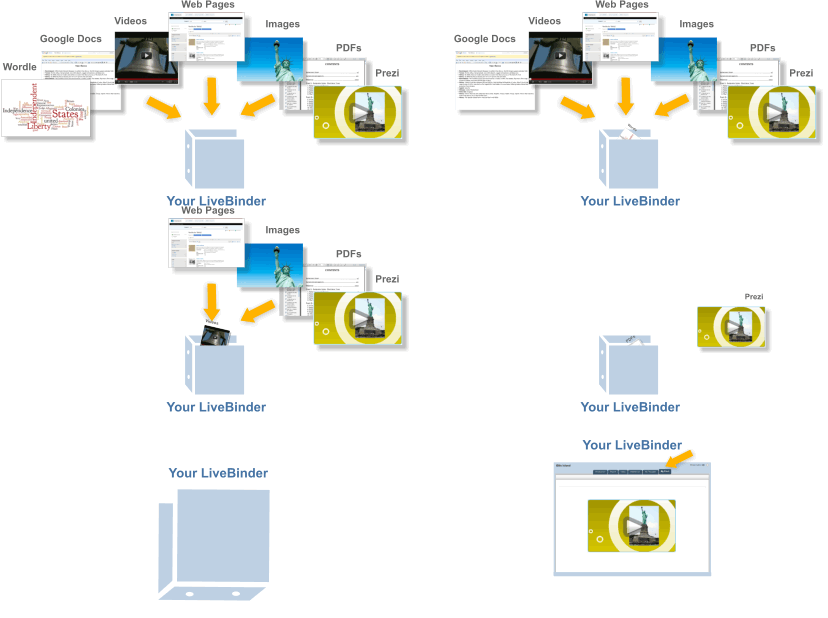
LiveBinders app for iPad gives you quick access to all of the binders you've created and those you've collected on your custom shelves. This version uses Safari browser to present and edit these binders.
Make an impression: LiveBinders lets you integrate the content you use and collect in the cloud. Create virtual binders of information on any topic. Add your own text to further personalize your resources. Impress your colleagues, teachers, and clients with an elegant way to present information that can easily be updated and accessed from any location at any time. You can now completely avoid those out-of-date, cumbersome email attachments.
Key features of Evernote:
Create text, photo and audio notes
Auto-synchronize your notes to your Mac, PC, and Web
Magically makes text within snapshots searchable
Mark notes as "Favorite" for quick access
All notes include geo-location information for mapping and search
✶ Premium Feature: File Synchronization - add, sync, access, and share files (PDF, Word, Excel, PPT, and more) among the different versions of Evernote you use
Here are some ways to use Evernote for your personal and professional life:
For research and class notes
To capture blog ideas and design inspiration
To stay in-sync with your desktop notes, web clips, and files
To snap photos of whiteboards and wine labels
As part of your GTD system to help you stay organized
To record voice memos
Read your docs or flip through your albums when you're out and about. Save photos or videos to your Dropbox and share them with friends in just a couple taps. Even if you accidentally leave your iPhone in a taxi, your stuff is always safe on Dropbox.
Features:
● Always have your stuff with you, no matter where you are.
● Add files to "Favorites" for fast, offline viewing.
● Easily save photos and videos to your Dropbox.
● Share your photos and docs with family and friends.
● Save email attachments straight to your Dropbox






![WBG Sensible SocialMediaChecklist v2.0 Sensible Social Media Checklist for Business v.2.0 [INFOGRAPHIC]](https://lh3.googleusercontent.com/blogger_img_proxy/AEn0k_sRc_4jAlvvjPDxn19Hfa6VNMmSa8StHHv2lTZLw3zzpoRmG-8iB8lNbKqT7ihc4D7Y0E0kbyzw7GRzH8ZUvOotcWlShXf5Q3KQHHGFMMZF-b1wrx3cWV3pIRfZ-gHxmA01a6M-_vRrCL4_vJG-s0MjIbSlnWwlNLyxy72-c-etR5aeR4UBGfO3Xj4=s0-d "Sensible Social Media Checklist for Businesses v2.0")


