vineri, 11 ianuarie 2013

Proud to be #co13 presenter about #Curation after I was winner in @eFrontLearning global competition #edtech20 #pln

I am verry excited to see so many people who joined my online class( more than 700 registered to attend ) . Like I promise you you can download the presentation,join Curation Google Plus Community https://plus.google.com/communities/100188349857613823793 and like https://www.facebook.com/
CurationRestartEducationProject .#co13 Top 10 startup social media curation tools for Social learning in the workplace that will change research in XXI Century Education by @LucianeCurator


Here is the recording of my session .


Thanks Dr. Nellie Deutsch because you offer me embed code for my session . Dear friends after the session I invite you all to see / download my presentation here on my blog  and still then click on screen capture .


Dear efront eLearning team thank you because you selected me in top 5 finalists articles and now Ipad Winner in your Competition after 3 weeks of sharing / comments for our guest posts . Now I want to thank you to all my friends because with your help I have more than 400 shares and 12 comments I am Winner with next Title of blog post : Top 10 startup social media curation tools for Social learning in the workplace who will change research in XXI Century Education . Now I want to invite you to join my Curation session / online wiziq class  in Connecting Online 2013 Conference https://www.facebook.com/events/314906631960258/ to read my greetings for you in 2013 and 2012 year in review http://bitly.com/LucianeCuratorwishyouHAPPYNEWYEAR2013 and my letter to Santa using a startup social media curation tool http://checkthis.com/fvn/ where I please him to help me to win the Ipad competition and I pray to God to help me to implement a platform / website for Curation Restart  Education Project http://krunchd.com/CredProject ;  ; https://twitter.com/web20education . 
             Now I must told you that I will continue to write on this blog about TOP 10 weekly and your repplies, comments ; feed-back is welcome for all my blog posts.
                                                       
\


I chose to write about this topic now because I discover in 2011 a new social media king who is Curation, the Art of : searching, selecting, sharing/bookmarking , organizing, interaction, communication, . In XXI Century Education where informatics and science developed spectacular and the use of new technologies aren’t regarded like a avangardist movement new tools and apps Web 2.0 and socialmedia can bring a new dimension and can reform education around the world because electroniccommunication helps teachers and students to learn from each other.These new tehnologies can stimulate discussion, open gatewaythrough knowledge, promote creativity and innovation for effective learning. Teacher and also students should have an entitlement to safe internet access at all times. Pulling Piaget and Papert, the use of participatory media tools in education is typically geared towards, creating a more student centered in a adaptive environnement where learners can contribute to the course material,formulate and express their own insights and opinion, construct their own understanding of materialby connecting concepts, to personal experience or current events, and learn from one another in collaborative environments . Web 2.0, social media and other digital and information tehnologies are powerful and interesting tools,which open up new opportunities for everyone and for this reason teachers and students must know how to use it in nowadays education The Internet Curator’s role is to seek on the web information related to a specific domain, flter them, select them, organise, share and present them in a unique mode .

For this reason I want to implement the project Curation Restart Education Project http://krunchd.com/CredProjectNow I will describe my favrorites / top 10 startup curation tools who will bring a new dimmension for XXI Century Education although I discover this year more than 100 and you can read about here http://edtech20curationprojectineducation.blogspot.ro/ and about startup edtools and edapps here http://startup4edu.blogspot.ro/ and also about ipad apps to mLearning here : http://ipadappsineducationtomlearning.blogspot.ro/

Now here is the article with logos and links because I use all next tools almost daily  .


1. Glogster Edu is my favorite curation and presentation tool and I am proud to be a Ambassador.This edu tool open gateway through knowledge for students because develop children’s creativity and innovation . Glogster EDU is the leading global education platform for the creative expression of knowledge and skills in the classroom and beyond. GlogsterEdu empower educators and students with the technology to create GLOGS - online multimedia posters - with text, photos, videos, graphics,sounds, drawings, data attachments and more. I made a GlogsterEdu for Curation Restart Education Project http://dumacornellucian.edu.glogster.com/credproject/
 
2. Scoop.it enables professionals to share important ideas with the right audiences giving them an opportunity to create and maintain a meaningful Web presence, a crucial component to the success of their business and career. Scoop.it lets you share ideas that matter and shine on the Web through beautiful topic pages. Collect relevant content and add your insight to attract an avid audience. Whether you’re a professional or educator representing a business or nonprofit, Scoop.it will help you efficiently and effectively build your online presence. Scoop.it is a one-stop shop for social media and content curation publishing. When you post on your topic page, you can easily share to your social networks including Twitter, Facebook, LinkedIn and Google+. Advanced analytics available on Scoop.it Pro and customizable pages, post scheduling and Wordpress integration available on Scoop.it Business. 


3. Learnist is the latest social media curation tool for education , still in beta launch by Grockit team . Learnist super easy to share what you know by pointing to existing web resources. You can use videos, blogs, books, documents, images, anything to explain how to learn something.Use Learnist to share what you know and learn new things. Create Learn Boards on topics you understand and add learnings by pointing to videos, blogs, images and documents on the web. Board creation permissions are granted on rolling basis.
                                   

4.Pinterest lets you organize and share all the beautiful things you find on the web. Teachers use pinboards to manage their projects and also People use pinboards plan their weddings, decorate their homes, and organize their favorite recipes. Best of all, you can browse pinboards created by other people. Browsing pinboards is a fun way to discover new things and get inspiration from people who share your interests. To get started, request an invite or leave a comment after you read my post with your email and I will send you a invitation to try this curation tool . Also don't forget that you must pin a immage to bookmark on pinterest . 
5 . Mentormob is a social media startup curation tool who make learning online free and accessible to the entire world . One Learning Playlist Can Reach Millions...Creating and editing Learning Playlists is a free and easy process. Not only does it show the world what you know, but it opens your knowledge to people who share your skills so they can help you refine it by adding and editing your Learning Playlist. Each Learning Playlist can be rated, bringing the best ways to learn to the top of the charts.Creating and editing Learning Playlists opens the door to being able to share your skills and get feedback from those who share your passion.So finally, we can get some real organization when learning online because after all, it's not up to the Internet to make learning free and accessible to the world, it's up to us.
 
6. Mightybell This is about infusing passion and color into everyday life. Too often, we spend time on what we have to do, not what we want to do. We’ve lost the ability to follow what makes us curious, in favor of choosing what makes us more efficient.With Mightybell, you can step into a world of curiosity and serendipity. By making space for ideas, interests and adventures with friends, you’re embracing the opportunity to create a more colorful life. Each Mightybell space has a story, one you can share with as many likeminded people as you want. You can share : a question, an article, a link, a video or a photo about something that interests you is all you need to start a Mightybell space. After all, you never know when you’ll discover your next passion.


7. Springpad Smart Notebooks to save, share and act on what's important to you and to your friends .Springpad now makes it easy to invite your friends so you can make awesome notebooks together. Springpad is great for just about anything and it's even better when you invite your friends.Springing just got easier .Now you can just type in the information you want to save and let Springpad do the rest. Try typing in a task you want to remember, an event you want to save, a movie you want to see, or a product you want to buy. It's that easy!
                                  
8. SymbalooEdu is a social media curation tool, great resource for teachers. With Symbaloo you can: Gather the best content on the web about 1 topic, and present it on a webmix Share a webmix with other teachers, and students . Discover useful webmixes in the Symbaloo Gallery to use in the classroom Share a webmix withparents to provide some insight of the used materials A worthy mention: Symbaloo is free of charge and doesn’t include any annoying ads.
                            

9. Zeen is a social media startup curation tool launch by Avos ( YouTube Co-founders) who offer a cool new way to share your interests with the world – bring pictures, prose, and videos together in eye-catching digital magazines.                                
10 . Socl — pronounced social — allows you to express and share your ideas through rich post collages comprised of images, links, captions and videos.Socl is a research project from Microsoft Research FUSE Labs and began as an experiment in social search targeted at students for the purpose of learning. Following the lead of the Socl community, Socl has since evolved to be a service where people connect over shared interests expressed through beautiful posts that take only seconds to create.


With consideration and respect http://xeeme.com/Lucianecurator/

marți, 8 ianuarie 2013

Top 10 free #2013evo session you should join #edtech20 #pln


Last year I was participated in some sessions organized in EVO 2012 . The Electronic Village Online Sessions are organized between  January 14, 2013 - February 17, 2013 http://evosessions.pbworks.com/w/page/10708567/FrontPage  Registration is Jan 7-13, 2013 - Join a session!
Now I want to wish  you again a HAPPY AND SUCCESSFUL YEAR 2013 and I want to tell you that this year I will continue to blog TOP 10 and I invite you to join my session in CO13 . I begin to write  about Curation in 1st Oline Curation eBook where everyone can propose new articles and chapters http://www.widbook.com/book/cover/2425/ .
For five weeks in January-February, participants and ESOL experts can engage in collaborative, online discussion or hands-on virtual workshops of professional and scholarly benefit. These sessions will bring together participants for a longer period of time than is permitted by land-based professional development conventions and will allow a fuller development of ideas than is otherwise possible. Sessions are free and open to anyone around the globe.
Now when I write this post I already applied to join 4 Sessions :  MOODLE for Teachers , Multiliteracies for Social Networking and Collaborative Learning Environments , Digital Storytelling for Young Learners  , Neuroscience in Education
Click on the name of a session below to view the complete session description. 
Join a session by following the link to the online platform at the bottom of each description. REGISTRATION FROM JAN 7TH TO JAN 13TH
The sessions begin on January 14th but are held asynchronously; that is, you can log in, begin reading, and join the email discussion of the materials. However, your moderators will provide some synchronous activities where you gather for a live meeting on your topic of study. See your session's syllabus of weekly activities for details. 

What session is your favorite ? Leave here a comment .
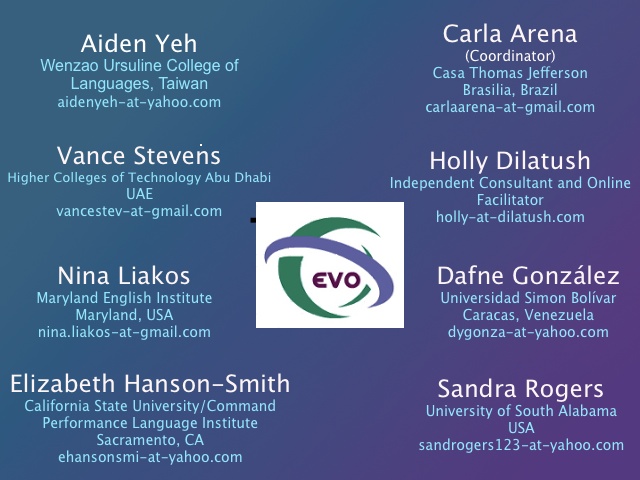
Becoming a Webhead 2013

Sponsored by TESOL CALL IS organized by
Teresa Almeida d'Eça
Dafne Gonzalez
Fernanda Rodrígues
Larissa Olesova
Webheads in Action is a long-standing community of practice of language teachers worldwide, coordinated by Vance Stevens. In the Becoming a Webhead workshop, which is an introduction to Webheads in Action, we explore Web communication tools and share the best ways of using them in our teaching practices, engage with students in virtual classes, collaborate in projects, and participate in conferences as audience and presenters. This collaboration takes place online, as we are all geographically apart. 
The Wonderful World of Teaching English Through Drama


Sponsored by the TESOL Drama E-group and the Speaking, Listening, and Pronunciation IS organized by 
Gary Carkin
Nigel Caplan
Shin-Mei Kao
Susan Hillyard
Leslie Sapp
Fernanda Molla
Holly Dilatush
George Plautz
Jessica Davis
TESOL-Drama is a nine-year old worldwide community of language drama practitioners, coordinated by Gary Carkin and moderated by Shin-Mei Kao, Susan Hillyard, Leslie Sapp, Fernanda Molla, Jessica Davis, Nigel Caplan, Judy Trupin, Holly Dilatush, George Plautz and others.
In the annual TESOL-Drama Workshops we explore, via collaborative online interaction, effective approaches to learning language through drama, discussion of drama-related issues, and encouragement of the use of drama -- in its many forms -- to support language learning.
Digital Storytelling for Young Learners


Sponsored by IATEFL Young Learners & Teens SIG, JALT Teaching Children SIG, 
and ARCALL 
Shelly Terrell 
Özge Karaoglu
Esra Girgin
Jennifer Verschoor
David Dodgson
Michelle Worgan Eva Buyuksimkesyan
Marisa Constantinides 
Juan Uribe
How do we encourage young learners to use the English they learn in a meaningful context? Children can have access to various online creation and publication tools to share stories. Participants will explore various applications that motivate learners to share stories through comic creation tools, free Web 2.0 tools, mobile devices, and more.
Designed for Business
Sponsored by TESOL CALL-IS,
IATEFL BESIG
Claire Hart
Mercedes Viola
Kristen Acquaviva
Roy Bicknell
Jennifer Verschoor
Charles Rei
Nicolas Celedon
Justine ArenaCourse design is crucial to a course´s success. Within the business English world, which will be the main focus of our attention, meeting learners´needs through effective course design is always desirable and often essential. We will explore different approaches to course design, offering ideas, strategies and tips for professionals. 
Neuroscience in Education- Braining Up Your English Lessons
Sponsored by Brazil TESOL,  TESOL EFL IS, and TESOL NNEST IS organized by 
Ana Maria Menezes
Carla Arena
Cheryl Oakes
Denise Felice
Jane Petring
Mary Hillis
Nina Lyulkun
Learning happens in our brains. It's a physical and biological process. Brain-based teaching and learning focus on how the brain learns best and how language teachers can learn to understand and use this knowledge to help students learn English effectively. Much is already known about brain functioning during learning processes to orient the practice of teaching. The brain and learning are the bridge that teachers can and must cross with knowledge that effectively connects them to learners.
In this five-week online workshop offered through the Electronic Village Online, participants will explore how the brain works during the learning process and they will be introduced to helpful tips to enhance their teaching practice. By the end of the workshop, participants will have had an overview of how neuroscientific research findings can positively impact educators' pedagogical approach to spice up their lesson plans to promote students' creativity, engagement and learning. We promise it will be madly fun and informative!
Multiliteracies for Social Networking and Collaborative Learning Environments


Sponsored by TESOL CALL-IS 
TESOL Affiliate (IATEFL, BrazTESOL, JALT, AVEALMEC) organized by
Vance Stevens
Ana Cristina Pratas
Claire Bradin Siskin
Tony Gurr
This session applies connectivist and multiliteracies approaches to exploring recent developments and issues in open learning, and how these might apply to more conventional settings. The session is paced on Cormier’s 5 stages of MOOC participation: orient, declare, network, cluster, focus. Participants declare their personal goals for the course and trace their progress through eportfolios, either simple or elaborate. Any reasonable level of participation earns a badge in the course.
MachinEVO
Video Productions of Language Learning Conversations


Sponsored by TESOL VDMIS and 
EFL IS organized by
Dr. Randall Sadler
Carol Rainbow 
Heike Philp
Shelwyn Corrigan
Barbara McQueen
Jens Kjær Olsen
This is the second MachinEVO session we would like to offer on EduNation in Second Life. Last year's session was very successful with many educators participating and many machinimas having been produced. A machinima is a video recording of a 3D environment, and in our case we focused on recording language learning conversations. However, these kinds of recordings are technically very challenging, and last year, we were still very inexperienced. Yes, we learned a lot, thanks to our great experts' advice. This year, we hope to improve our technical skills and look forward to learning together. 
Mentoring

Sponsored by TESOL NNEST IS and Social Responsibility IS organized by :
Valerie Jakar
Laura Stoutenburg
Marina Gonzalez
Tamas Lorincz
Daniela Wagner-Loera
Mentor Interaction is intensifying the understanding of counseling, consulting, and peer dialogue from the previous EVO sessions. Teachers of ESL/EFL will receive a review on mentoring to build a solid base to build in-depth understanding of the key aspects of the mentoring relationship.The aim of this course is to help education professionals understand the characteristics and the importance of mentoring in becoming expert teachers. The readings, discussions, case studies and assignments will focus on practical aspects of creating and maintaining successful mentoring relationships. 
MOODLE for Teachers

Sponsored by TESOL CALL-IS organized by
Nellie Deutsch
Ludmila Smirnova 
Moodle for Teachers (M4T) 2013 EVO online workshop will take place on a Moodle website called Integrating Technology for Active Lifelong Learning (IT4ALL). The aim of the M4T workshop is to provide participants who have never used Moodle or who would like to enrich their previous Moodle experiences with the knowledge and skills to navigate a Moodle course, access resources, activities, and blocks from a student perspective and practice the same Moodle features in class practice sections as teachers. The participants will develop a lesson or course on Moodle. 
Podcasting for the ESL-EFL Classroom


Sponsored by the  
TESOL CALL IS , AVEALMEC , VENTESOL-TECH SIG , VDM-IS organized by
Evelyn Izquierdo
Miguel Mendoza
Miguel Pérez
Yuly Asención-Delaney
In recent years, podcasting has become one of the most powerful asynchronous Web 2.0 tools in our classrooms. Its enormous educational potential allows teachers to use it as a simple resource to support activities within the classroom and to create audio recordings of happenings in their schools. This workshop aims at providing basic proficiency related to the production and publishing of digital media files (podcasts) and the implementation of podcasting in the language classroom to enhance communication in speaking and listening skills.

duminică, 30 decembrie 2012

@LucianeCurator wish you all HAPPY NEW YEAR . See my Top 10 Year 2012 in review #edtech20 #pln


Dear friends I must told you that Christmas time is my favorite period of the year when carols proclaims the Birth of Son of God . For this reason I develop Christmas Projects with my students with special needs to proclaims Messiah's Birth and this year I made for Santa and my friends a Social Media Curation Christmas Tree.
Now when 2013 is near the door I wish you HAPPY NEW YEAR with peace and happiness and all your wishes come true . I invite you all to drink a coup a champagne for New Years Eve.
2012 was a full year of Social Media for me and for this reason I invite you to read my top 10 Year 2012 in review and my glogsteredu presentation . Also next year I WILL describe weekly my top 10 tools / apps related to a subject in this blog.
I am happy to be finalist in Ipad eLearning Competition organized by eFront e-Learning with my guest post : Top 10 Startup Social Media Curation Tools for Social Learning in the Workplace . Click here to read my article http://bitly.com/LucianeCuratorpleaseyoutosharecurationaticle . Now I need you to help me to win a Ipad : If you like my article Please Be Sociable, Share my article using social media channels from eFront Blog ( Tweet , G+ , LIKE , share on Linked.In , Delicious , Reddit, Digg … ) . If you are a social media curator please add your feed-back and comments to my guest post . I hope you liked 1st Social Media Curation Christmas Tree made for Santa and my PLN http://bitly.com/LucianeCuratorwishyouMerryChristmas Also I invite you to read my last blog from yestarday post and leave your feed-back : Top 10 social media curation tools to unleash the power of your ipad http://bitly.com/Top10iPadCurationedapps . See you all on twitter https://twitter.com/web20education and join and collaborate in 1st Social Media Curation Google+ Community https://plus.google.com/communities/100188349857613823793
Top 10 Year 2012 in review
http://teacherluciandumaweb20.blogspot.ro/search/label/top%2010
This year 2012 I write more about Curation and Social Media Startup edtools and you can read in my next blog post about more than 100 tools and apps
1 . December - +Lucian Duma wish you all a Blessed Christmas and offer you a Social Media Curation Christmas Tree http://teacherluciandumaweb20.blogspot.com/2012/12/lucianecurator-wish-you-all-blessed.html
2. December - Top 10 social media curation apps to unleash the power of your Ipad http://teacherluciandumaweb20.blogspot.com/2012/12/mlearning-in-education-in-2013-using.html
3.November - Top 10 social media tools to brand yourself
http://teacherluciandumaweb20.blogspot.com/2012/12/top-10-socialmedia-free-tools-to-brand.html
4. September - My favorite - Top 10 romanian startup at How to Web 2012 http://teacherluciandumaweb20.blogspot.com/
2012/11/my-favorite-top-10-romanian-edtech.html
5. September-Top 10 big eLearning enews for back to school 2012
http://teacherluciandumaweb20.blogspot.com/2012/09/top-10-big-elearning-enews-for.html
6. Proud to be leader in Smile EUN Project COP2 and to present my top 10 #curation tools build #edtech20  4 #leadershipday12
http://teacherluciandumaweb20.blogspot.ro/2012/07/proud-to-be-leader-in-smile-eun-project.html
7. June : My Top 10 exciting new #startup at #leweb12 Competition #edtech20 #pln
http://teacherluciandumaweb20.blogspot.ro/2012/06/my-top-10-exciting-new-startup-at.html
8. April : Top 10 #startup tools to make #easter presentations
http://teacherluciandumaweb20.blogspot.ro/2012/04/dear-edtech20-pln-christ-is-risen-top.html
9. January : #Curation Restart Education Project . Top 10 #edtech20 tools who will change research this year http://krunchd.com/CredProject
10 . In may 2012 I had the opportunity to participate at Intel Teach Essentials Training Course in Prague because GlogsterEDU team invite me because I am a proud ambassador . Here you can read my reflections http://teacherluciandumaweb20.blogspot.com/2012/05/me.html
NOW DEAR FRIEND, reader of my blog it's your turn to tell me what blog post you like more and why . Please leave a comment and feed-back after you enjoy reading my blog :)
Now I have my original presentation on GlogsterEDU here linked to my research and my blogs :
Blogging weekly My research and top 10 tools / apps http://teacherluciandumaweb20.blogspot.ro/
Subscribe http://feeds.feedburner.com/MyPln-PersonalLearningNetwork
Blogging daily in :
Curation edtools and apps in education Blog http://edtech20curationprojectineducation.blogspot.ro/      Subscribe http://feeds.feedburner.com/edtech20CurationSemantic ProjectInEducation
Startup edtools and apps for education Blog http://startup4edu.blogspot.ro/                                               Subscribe http://feeds.feedburner.com/startup4edu
Ipad apps in Education to mLearning Blog http://ipadappsineducationtomlearning.blogspot.ro/ 

vineri, 28 decembrie 2012

Top 10 #socialmedia #curation apps to unleash the power of your #ipad in 2013 #edtech20 #pln - part 1

                                             
Dear friends I hope all of you had a Blessed Christmas and you like my social media curation Christmas Tree made for you .        Now I want to wish you all Happy New Year 2013 with peace and happiness and I hope next year all your dreams come true and I invite you to drink with me a cup of champagne   . I really want next year to find parteners who want to help me to launch a platform / website for Curation Restart Education Project https://twitter.com/web20education and teachers  who want to collaborate with me in this global project . In the same time I will continue to describe weekly my top10 tools related to a topic here
   My 2012 year in review - a curation story : http://checkthis.com/fvn
Now I will describe favorite social media curation apps for ipad . What app do you use / you like more and why ? Please leave a comment and feed-back .
I decided to post daily awesome ipad apps in my new blog here http://ipadappsineducationtomlearning.blogspot.com/
I invite you all also to read next blog post : 2012 year in review with my top 10 articles this year .

Learnist is one of my favorite social media Curation startup tool for education and for this reason I integrateLearnist in my Curation Christmas Tree . Learnist makes sharing what you know and learning from others fast and easy by remixing anything on the web like videos, ebooks, maps, blogs, podcasts, surveys and more into a simple and elegant learning resource on any topic that you can share with anyone. Learnist is like a collaborative, multimedia and interactive ebook from the future.
Features :
Learnist iPad app lets you browse Learnboards with content curated from websites and blogs, YouTube, Vimeo, Wordpress, Wikipedia, UStream, Scribd, Soundcloud, Slideshare, Amazon, Google Docs, Spreadsheets, Forms, Slideshows, Google Maps and Books, and more.
Learnist’s iPhone App also lets you create Learnboards with uploaded photos on any subject imaginable - live events, recipes, how-to guides, and more.
Browse and Learn
- Browse Learnboards created by experts, teachers, professors, your friends and fellow learners covering thousands of topics in categories like Art & Design, Music, Sports, Education, Food & Drinks, Politics, Technology, Travel, Games, Health & Fitness, News, Entertainment, Crafts and more.
- Follow your favorite Learn Boards and people to get updated on their newest content.
- Collaborate and ask questions about anything in Learnist and help others on topics you know.
- Track your progress on Learnboards and see that progress on your profile page.
- Find information by quickly searching tags, titles and keywords.
Share Easily
- Curate learning resources you like and share them with your followers.
- With the iPhone app you can instantly upload content to Learnist from your iPhone camera or photo gallery.
- Share via email, SMS, Facebook, and Twitter

Flipboard is a personal news magazine filled with everything being shared across the Web, from breaking news to stories on world events, sports, travel and more. Simply pick a few topics and your Flipboard is instantly populated with the news you care about. If you want more, use the search bar to find favorite sources or browse recommended reading from the staff at Flipboard. When you find a new source you love, just tap the “+” to add it to your Flipboard. And if you’re short on time, use the Cover Stories tile to see some of the most interesting stories from all of your sections on Flipboard.
But it’s not just about news. Use Flipboard to flip through social networks. Add Facebook, Twitter to browse articles and photos friends are sharing. Instagram and Flickr photos are beautiful to see in your personal magazine. Now the news your friends share is easy to flip through, with headlines and excerpts that give you an immediate glimpse into everything. It’s a fun way to catch up on all your social news.

Just tap a tile and start flipping through the pages of your magazine.


Trapit is a startup app to rule the web using ipad .
Connect with long standing passions and explore new subjects, all delivered in a elegant experience meticulously designed just for the iPad. Built with powerful AI technology, Trapit delivers an on-going personalized selection of the newest articles, features, blogs and video on the topics you care about and learns as you use it.
Escape with Trapit and hone in on only the subjects that matter to you. Keep up with the topics that don’t always make the headlines, or even the ones that do. Discover new bloggers, online magazines, newspaper features and more among Trapit’s over 100,000 hand-picked sources.. Use Trapit to explore and discover, because really, that’s what the Internet was made for.
Features:
- Trapit captures fresh content from across the entire Web.
- You define the subjects--use Trapit to explore new topics or long standing passions.
- Trapit learns from your feedback and improves its recommendations the more you use it.
- A world of discoveries at your fingertips--discover new blogs, magazines, and writers.
- Easy sharing to Twitter, Facebook, and email, and anywhere else you like. And now scheduled sharing via Buffer.
- Get real-time highlights from all your Traps in the New Discoveries feed.
- Save articles, recipes, tutorials, and blog posts to your Trapit Reading List, Evernote, Instapaper or Pocket with the “Read Later” button.
Experience the Internet on the iPad the way it was meant to be. Download Trapit today!

Do you like this app . Leave also a comment if you know other apps like this 

This week I decide to describe on my blog many curation apps to mLearning .


Scoop.it lets you easily publish gorgeous online magazines by curating content on your favorite topic using your iphone . This tool is my favorite social media curation tool .
Curate on the go with the Scoop.it iPhone App:
- Select, edit and publish posts in the same engaging visual format as from the Web site
- Review your suggestion list
- Add posts from Safari mobile
- Share on all your connected Facebook, Twitter, Tumblr... accounts

You can downlod from app store for tree scoop.it .

Pinterest 
Pinterest is a Virtual Pinboard and it is my favorite curation tool for my interests .  It lets you organize and share all the beautiful things you find in your life. People use pinboards to plan their weddings, decorate their homes, and organize their favorite recipes.
Best of all, you can browse pinboards created by other people. Browsing pinboards is a fun way to discover new things and get inspiration from people who share your interests.
Features:
• Browse pins from people and pinboards you follow.
• Repin, like and comment on your favorite pins.
• Pin with your camera!
Happy pinning!


What makes Pearltrees unique?
 have everything you like on the web organized in one place
 play with pearls, they are made to be manipulated
share great content instantly, everything is public
 join +250.000 other users who are sharing +10 million pearls
 access your account from PC, Mac and iPad
 its free! (with no advertising)
How does it work?
create your account
install the pearler
collect web pages with the pearler
organize your pearls into pearltrees
explore what you’re interested in
enrich your account
share!

                           
Flud - For the first time ever, the things you read about give you topical credibility among your friends and followers. Beautiful design, simple user interface, and integrated social settings make Flud the best place to read your news.
Customize Flud to your personal tastes. Follow all your favorite blogs and news sites, save stories to read when you have time or offline, Flud articles you love, connect with friends and other Fluders who share your interests. Your Flud profile allows you to discover your news personality and become a credible source of information.
Features
- Easily add, reorder, or remove feeds
- Connect to Tumblr, Google Reader, Twitter, Facebook, Read It Later, Instapaper and email
- Create a Reading List of headlines that look interesting to you
- Access your Reading List wherever you are, no Internet required
- Play video, view images, read stories
- Find Fluders who share your interests in news, blogs, and topics
- Flud articles you love and share them with your followers
- See what your followers are reading with the Activity Feed
Uses
- Build your brand by tweeting the latest industry news
- For bloggers, offer Flud to your readers as a way to experience your content on a mobile platform
- Discover new websites, writers, blogs, or topics you didn’t know you loved
- Browse niche blogs and major news brands, silly news and science journals, at the same time
- “It's easy and good looking.


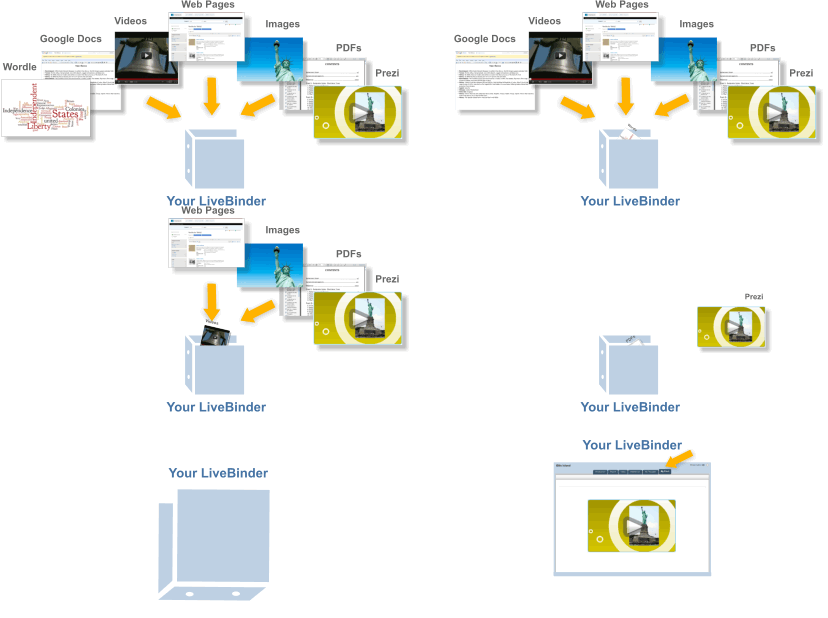
Livebinders allowss you to get the most from your iPad
LiveBinders app for iPad gives you quick access to all of the binders you've created and those you've collected on your custom shelves. This version uses Safari browser to present and edit these binders.
Make an impression: LiveBinders lets you integrate the content you use and collect in the cloud. Create virtual binders of information on any topic. Add your own text to further personalize your resources. Impress your colleagues, teachers, and clients with an elegant way to present information that can easily be updated and accessed from any location at any time. You can now completely avoid those out-of-date, cumbersome email attachments.


1 . Evernote turns the iPhone, iPod Touch and iPad into an extension of your brain, helping you remember anything and everything that happens in your life. From notes to ideas to snapshots to recordings, put it all into Evernote and watch as it instantly synchronizes from your iPhone to your Mac or Windows desktop. See why millions of people worldwide use Evernote:

Key features of Evernote:
Create text, photo and audio notes
Auto-synchronize your notes to your Mac, PC, and Web
Magically makes text within snapshots searchable
Mark notes as "Favorite" for quick access
All notes include geo-location information for mapping and search
✶ Premium Feature: File Synchronization - add, sync, access, and share files (PDF, Word, Excel, PPT, and more) among the different versions of Evernote you use

Here are some ways to use Evernote for your personal and professional life:

 For research and class notes
 To capture blog ideas and design inspiration
 To stay in-sync with your desktop notes, web clips, and files
To snap photos of whiteboards and wine labels
 As part of your GTD system to help you stay organized
 To record voice memos


2 . Dropbox is a free service that lets you bring all your photos, docs, and videos anywhere. After you install Dropbox on your computer, any file you save to your Dropbox will automatically save to all your computers, your iPhone and iPad and even the Dropbox website! With the Dropbox app, you can take everything that matters to you on the go.

Read your docs or flip through your albums when you're out and about. Save photos or videos to your Dropbox and share them with friends in just a couple taps. Even if you accidentally leave your iPhone in a taxi, your stuff is always safe on Dropbox.

Features:
● Always have your stuff with you, no matter where you are.
● Add files to "Favorites" for fast, offline viewing.
● Easily save photos and videos to your Dropbox.
● Share your photos and docs with family and friends.
● Save email attachments straight to your Dropbox


duminică, 23 decembrie 2012

@LucianeCurator wish you all a Blessed Christmas and offer you a #Curation #ChristmasTree #edtech20 #pln

Dear friends I wish you all a Blessed Christmas with peace in your soul and happiness in your heart . May the coming year to make all your dreams come true and and all your wishes to be fulfield .
Today when I adorned for Santa Claus this online Christmas Tree with my favorite 20 Social Media Curation Tools I invite you to sit near fireplace and listening carols with me and my family .
Family @ xmas
imikimi - sharing creativity

I, Duma Cornel Lucian am happy finalist in Ipad eLearning Competition by eFrontLearning https://bit.ly/LucianeCurator
pleaseyoutoshareandrtcurationguestarticle and please help me to win a Ipad reading my article : Top 10 Startup Social Media Curation Tools for Social Learning in the Workpace ( Glogster EDU Symbaloo.com Scoop.itLearnist Pinterest MentorMob Mightybell springpad Zeen @so.cl . If you like the article after you read it, down of the page are social media sharing buttons ( facebook like , tweeet , share using social media channels )
Please leave a comment if you like this online Christmas Tree and also write what social media curation tools you like more and why 
                        I really want to decribe my top 20 soial media curation tools, but the Birth of Son of God is near the door and I develop and participated in many Christmas activities .Here you can see 
THE DIGITAL STORY OF THE NATIVITY
 listen beautiful Carols with soloists from Timisoara and my students . 

Featured Post

For #notatiste15 : Top 100 presentations #elearning #edtools and #ipad apps to emaze a global audience like #iste2015

Between 28 june and 1 july in PHILADELPHIA, USA  is organized ISTE’s Annual Conference and Exposition  https://www.isteconference.org/201...

Totalul afișărilor de pagină